

Usage
How to Use DQue Connect
Section titled “How to Use DQue Connect”DQue Connect is a program that helps you easily manage and run SSH port forwarding settings in Windows and macOS environments.
Main Screen
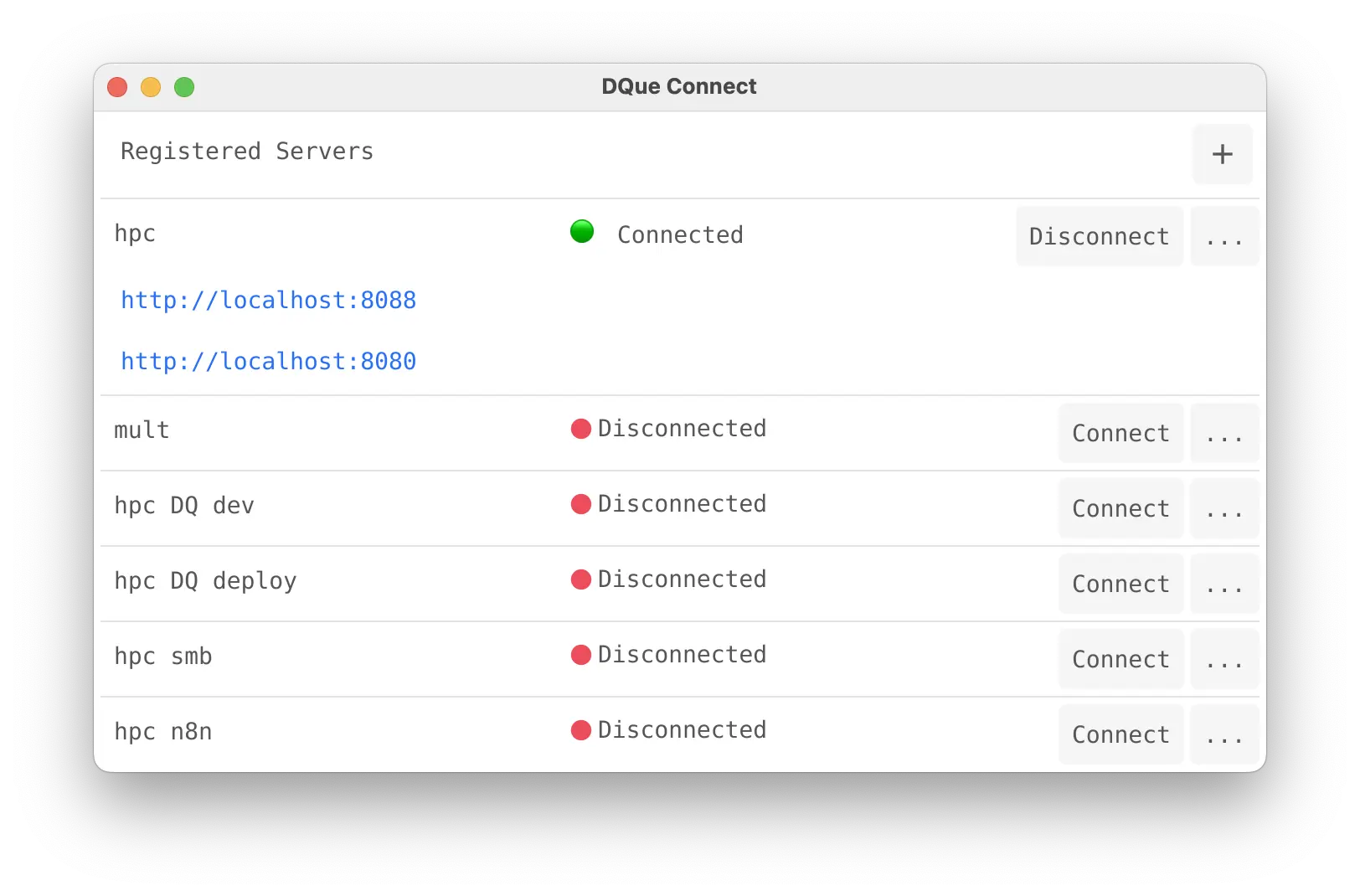
Section titled “Main Screen”When you run the program, a list of registered servers is displayed.

Each server item includes the following information and functions:
- Server Name (Alias): An alias assigned by the user for easy identification (e.g.,
hpc,mult). - Status: Indicates the current connection status with the server.
- 🔴 Disconnected: Not connected.
- 🟢 Connected: Successfully connected.
- Connect / Disconnect Button: Starts or stops the SSH connection and port forwarding for the server.
- … Button: Opens a menu to modify or delete the server’s settings.
- + Button (Top Right): Adds a new server configuration.
Connecting to a Server
Section titled “Connecting to a Server”Click the Connect button for the server item you want to connect to.
If the connection is successful, the status will change to 🟢 Connected, and depending on the configured port forwarding rules, an accessible address from your local machine (e.g., http://localhost:8088) may be displayed.
Disconnecting from a Server
Section titled “Disconnecting from a Server”Click the Disconnect button for the connected server item to terminate the connection.